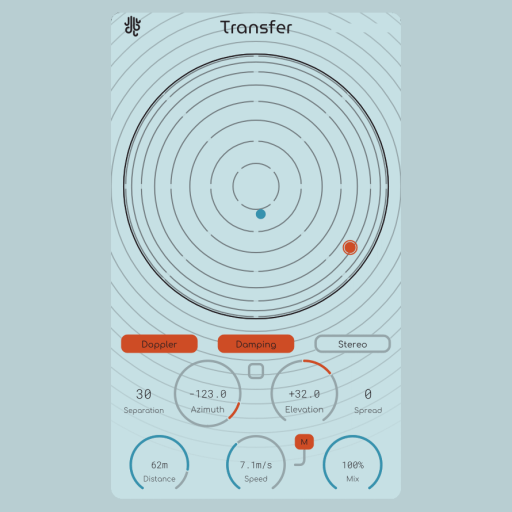
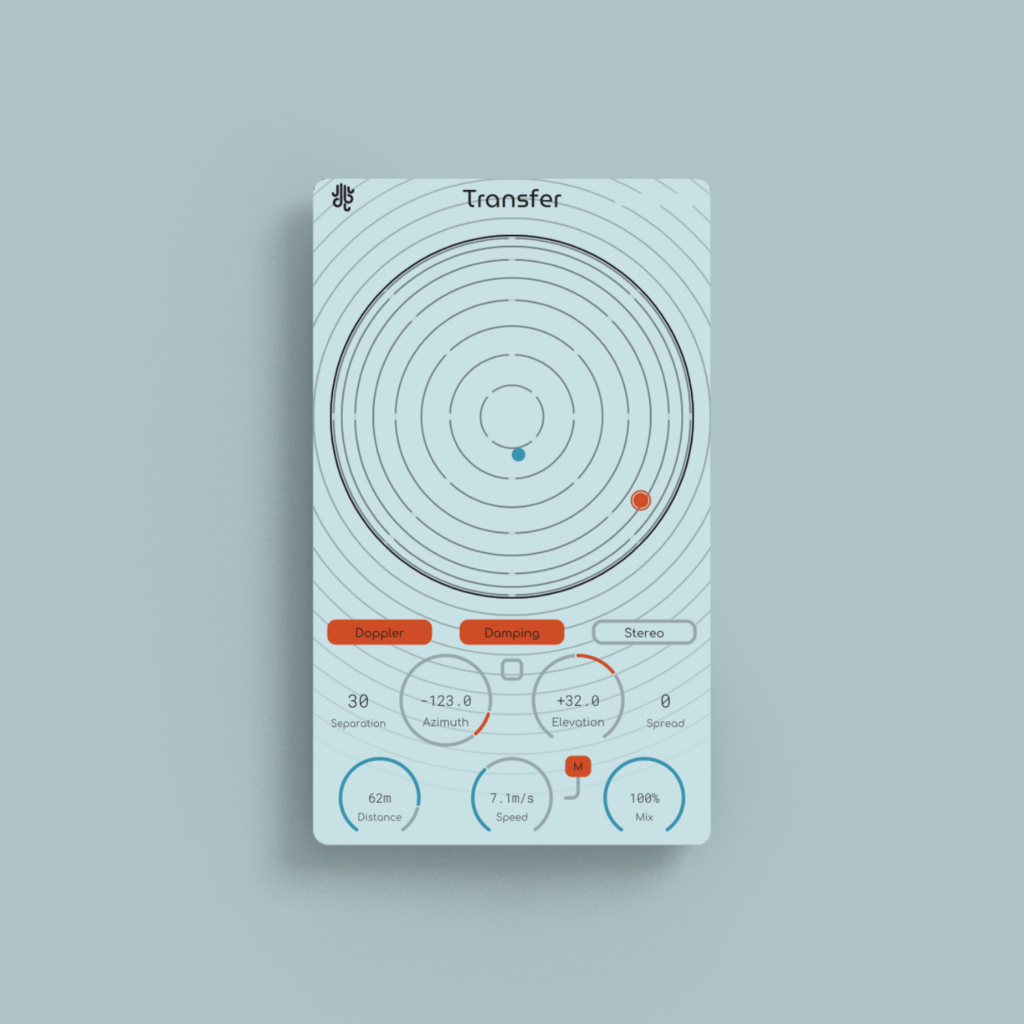
Transfer is an audio positioner.
Other doppler plugins have confusing controls. Other spatialization plugins are unintuitive. Transfer handles both of these problems and packages them together, as it should be.
Taking advantage of ambisonic audio, Transfer handles the processes associated with both encoding and decoding of the sound internally, without having to mess around with a bunch of variables. Transfer keeps it dead simple; audio in, spatialized signal out.
Transfer also features two different control modes; a full spherical positioner, as well as an X/Y pad representing the left/right/front/back space around the listener.
Highlights
Binaural-Ready
Transfer models the human ear and filters incoming audio according to how your ears would perceive sound coming from a certain angle, allowing for an ultra-realistic spatial audio experience; without the high CPU usage!
Spread / Separation
Transfer is able to perform “spreading” on the audio source to reduce the listener’s ability to localize (or “point out”) the sound for a more subtle spatial effect. Additionally, Transfer can separate the incoming audio to two points (left and right if the incoming audio is in stereo) and have both channels come in at separate angles, but retaining the same “distance”.
Doppler-Enhanced
Transfer simulates the doppler effect in a way that is a mathematically perfect representation of how it sounds in real life.
Room Simulation
New In 1.2.0: Enable early & late reflections with the “Reflections” toggle button. You can simulate dimensions, as well as the materials of the space (or turn on “Size Sync” mode and map the size to the “Distance” parameter), and mix the early & late reflections’ volume to fine-tune it to your desired result. Powered by Impulse.
Overview
Don’t want to read the manual? Check out this video for a look into all of Transfer’s different features instead;
Copy Protection
No dongles
We don’t use any hardware dongle systems for activation, and no activation juggling is nescessary with our plugins.
Licenses are valid on up to 6 computers at once, and you can also do offline activation.
Buy it once, use it forever
We feel that any good tool should try to do it’s best to get out of your way, that’s why our plugins are not subscription based.
No need to worry about license validity here.
No tracking
Our plugins don’t collect any information on you.
The only times that they connect to the internet is for activation purposes, and to check for updates and news items (and you can turn these features off).
Updates
Blog posts related to Transfer
Updates: Introducing AAX Support + New License Key System
We are pleased to announce that all of our plugins now support AAX. We have also updated our licensing system. AAX Support All of our...
Read MoreUpdate: Introducing Keyboard Control In All Lese Plugins
To improve the workflow in our plugins, we’ve added WASD and arrow control to our entire plugin lineup. Here’s what we’ve added. Shift + whatever...
Read MoreTransfer Plugin Update 1.2: The Reflections Update
After a few months with Transfer out, we’ve gotten a lot of feedback, and a number of good ideas on how to improve it. Meet...
Read MoreNew Release: Transfer, A Doppler – Spatializer Audio Plugin
Meet Transfer. After using a lot of different audio spatialization plugins, we set out to create one that fulfilled a number of things that we...
Read More- Toggleable doppler delay and air dampening filters
- Binaural (HRTF) spatialization mode making use of a virtual speaker dodecahedron
- Stereo spatialization mode, for more basic spatial positioning
- Linear (constant speed) and smooth (filtered) movement modes
- Source spread and separation controls, allowing for a “smeared” perceptual position spread over a larger area
- Early & late reflection processor, with material-based room simulation
- Vectorized, resizable interface
Windows: Supports VST3 & AAX
MacOS: Supports VST3, AU & AAX (Intel and ARM)
A Manual for Transfer is included with the download package via Email. You can also check out the Lese Knowledge Base for Transfer’s manual.
Also Check Out...
(may only be loosely related, based on how many similar tags they have to Transfer)