Time to answer even more questions… Our Ambisonics article was more complicated and math-y than this one will be, though. Time to learn about how we’re able to trick you into thinking sound is coming from a certain direction!
Our spatial audio plugins (along with Impulse) all have binaural features, and there is a short explanation of what that’s doing in the manuals, but we’ll flesh it out more here
Binaural Sound
If Ambisonics is about describing a whole sound field mathematically and figuring out playback later, binaural audio is the opposite move: it skips straight to the one playback target that actually matters, your two ears, and attempts to recreate exactly what they’d hear in real life.
This is why binaural audio works so well for headphone listening specifically, and it doesn’t sound too good when you put it through speakers. It’s not a general-purpose spatial format like Ambisonics (or just plain old stereo). It’s a format built around one very specific listener, or at least, a very specific average of listeners.
Directional cues
Your brain figures out where a sound is coming from using a handful of cues, and almost all of them come down to just comparing what your left ear hears vs. your right ear.
The simplest one is timing. If a sound is off to your right, it reaches your right ear a tiny bit before it reaches your left ear, because your left ear is on the other side of your head and the sound has to travel that extra distance. This timing difference is under a millisecond, but your brain is shockingly good at picking up on that gap and using it to figure out direction.
The second big one is loudness. Your head is a physical obstacle sitting between your two ears, so a sound coming from your right doesn’t just arrive later at your left ear, it also arrives quieter, because your own skull is partially blocking and absorbing it on its way around. This is usually called the head shadow effect, and it’s a second, independent clue your brain cross-references against the timing difference.
Then there’s a subtler one: the shape of your outer ear (your pinna), plus your head and shoulders, filters sound in small but specific ways depending on where it’s coming from. Sound arriving from above gets colored slightly differently than sound arriving from directly in front, even if the timing and loudness differences are similar, because it bounces around the folds of your ear differently on the way in.
This is a big part of how you can tell up from down, or front from back, which are situations where the left-right timing and loudness cues alone don’t give you much to go on.
The technical term of how sound localization works (in the mathematical sense) is referred to as “Head Related Transfer Functions”, also known as HRTFs.
Making something sound like an ear
An HRTF is basically a measured (or modeled) description of exactly how sound gets changed by the time it travels from some point in space to your eardrum, once you account for your head, ears, and shoulders getting in the way.
In practice, HRTFs get built by putting tiny microphones in someone’s ears (sometimes a real person, sometimes a mannequin head built to represent an average human), then playing test sounds from a bunch of different positions all around them and recording exactly how each ear hears each position.
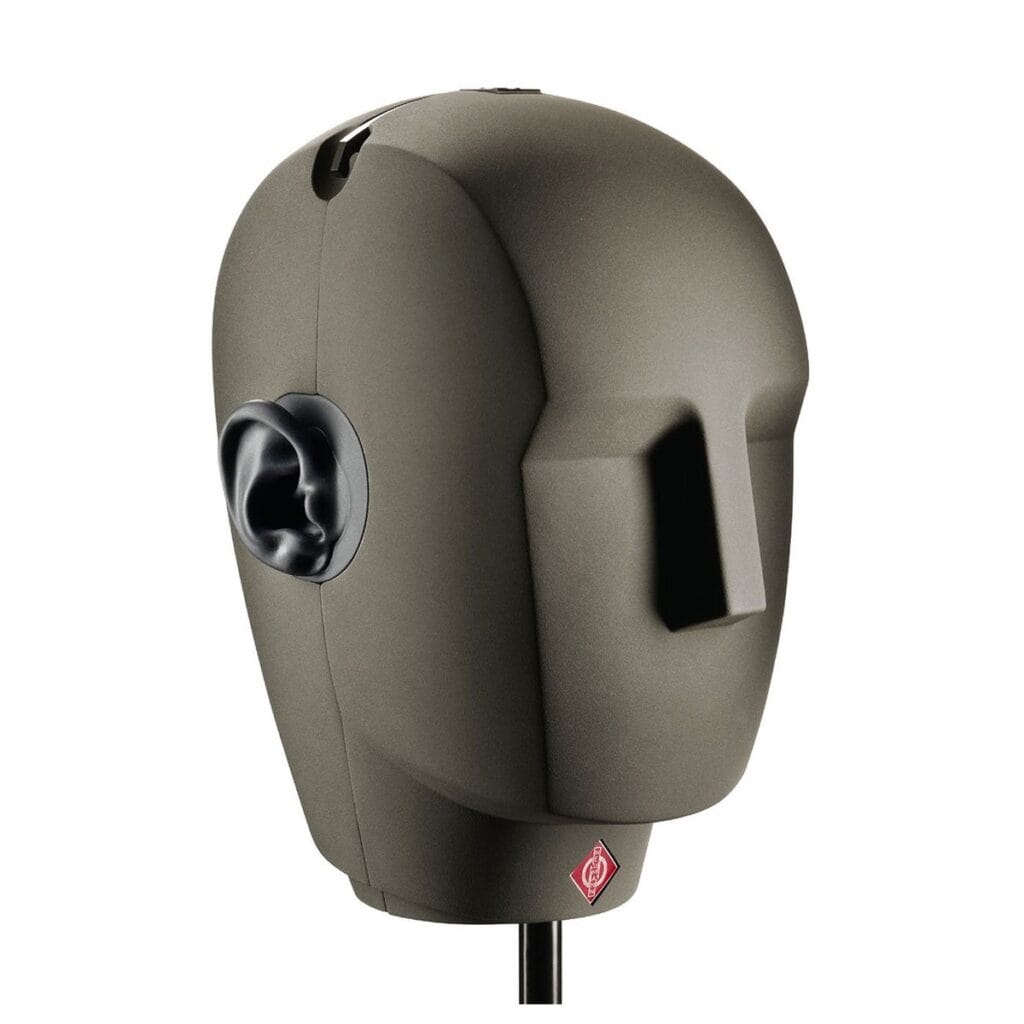
Once you have enough positions, encoding a sound binaurally becomes a matter of taking a plain mono sound, picking the direction you want it to seem like it’s coming from, and running it through the corresponding pair of filters from the HRTF.
Also, these “filters” are just impulse responses; the operation that’s used on convolution reverb is the same as what is typically done here, just with much shorter impulse responses (HRTFs being a few milliseconds, vs reverb IRs being 1000s of times longer than that).
Out the other end comes a stereo pair that, when played through headphones, tricks your ears into reconstructing that same timing gap, loudness gap, and tonal coloring your ears would get from a real sound at that position.
But what if my ears aren't an average shape?
Of course, the catch is that everyone’s head, ears, and shoulders are shaped a little differently, and HRTFs are extremely sensitive to that shape. The exact filtering your outer ear applies to an overhead sound is essentially your “auditory fingerprint”. That means an HRTF measured from one person’s ears won’t perfectly match how your ears would filter the same sound.
Most commercial binaural content uses a generic HRTF, averaged across a bunch of measured people (or modeled from a mannequin head), rather than one tailored to you specifically. This works well enough for most people most of the time, especially for left-right and front-back localization, but it’s also exactly why binaural audio sometimes gets front and back mixed up, or why elevation cues (sounds from above or below) can feel less convincing than the horizontal ones.
Some more advanced systems try to work around this by letting you pick from a handful of HRTF profiles, by scanning your ears, or by using head tracking to add motion cues that help compensate. Apple recently added some features in IOS for doing this, and there are also a number of startups and open source projects that do similar things.
If you wanted to use a custom binaural renderer with our spatial plugins, you can select the newly added ambisonic encoder feature, and then use a third party binaural decoder after the effect.
If you don’t want to switch to some external tool, the simple act of movement turns out to be a powerful trick in this case: if you tilt your head and a sound doesn’t move the way you’d expect, your brain gets extra evidence to correctly re-localize it, even if the raw HRTF isn’t a perfect match for your ears.
One last clarification
Using “Ambisonic mode” or using “binaural mode” in our plugins (or, most likely, any other spatial plugin for that matter) does not mean that Ambisonic encoding is not happening.
The binaural decoding is just a process that occurs after the Ambisonic encoding. The binaural decoder (at least in our plugins) uses the Ambisonic soundfield as a basis for it’s processing. We take each channel, and perform binaural filtering on it, and then mix them all together to produce the final result.